
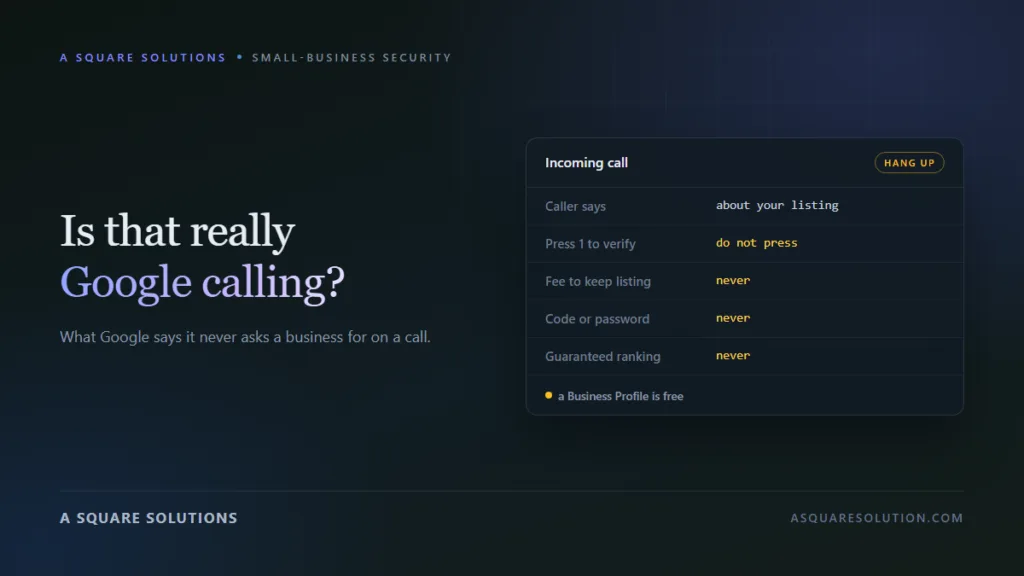
A recorded voice says your Google listing is unverified, about to expire or at risk of removal, and asks you to press 1. Many small-business owners have had this call. This guide sets out what Google says it does and does not do, how to tell a genuine automated call from a sales pitch, and what to do when one comes in.
Google Business Profile scam calls work because part of the story is true. Google does contact businesses, sometimes with automated calls. The scam borrows that fact and adds a threat, a fee or a request for a code.
Everything attributed to Google below comes from its own Business Profile Help pages, which we link to. We read them on 1 October 2026. Check them again if you are reading this much later, because Google updates its help content.
Does Google call businesses?
Yes, for a narrow set of reasons. Google’s page on automated calls and texts to your business says it contacts businesses to keep details current and to help customers, for example to confirm opening hours, check availability or make a booking on someone’s behalf.
According to Google, a genuine call:
- says it is from Google and explains why it is calling;
- may be automated or from a person;
- will never ask for payment, credit card information or account passwords.
You can also opt out. Google says you can tell the caller to stop contacting your business, or switch off automated calls and texts in your Business Profile settings.
What Google says it will never do
Google’s page on fraudulent calls and texts is direct about this. It says scammers often claim to work “with” or “for” Google to sell services to businesses, and that Google representatives will not:
- ask for payment information over the phone;
- guarantee you a special placement in Google’s products;
- ask you to sign up for a service or pay money on an unsolicited call.
A second page, on protecting your Business Profile, adds two points that settle most of these calls:
- A Business Profile is free. Google says it never charges to maintain, verify or reinstate one.
- Google will never ask for a one-time password or PIN.
So a call that asks for a fee to keep your listing, or for a code sent to your phone, is not Google.
The scripts these calls use
The wording changes. The structure does not. These are the patterns to recognise.
| What the caller says | What it is really after | Why it is not Google |
|---|---|---|
| “Your listing is not verified and will be removed. Press 1.” | A live sales call, and confirmation that your number answers | Google tells you to hang up and not press buttons |
| “There is a fee to keep or claim your profile.” | Your card details | Google says a profile is free to maintain, verify and reinstate |
| “We can put you on the first page of Google.” | A monthly contract | Google says its representatives do not guarantee placement |
| “Read me the code we just sent you.” | Control of your profile or your Google account | Google says it will never ask for a one-time password or PIN |
| “We are a Google partner and need access to fix your listing.” | Owner or manager access | Google advises limiting owner and manager roles to people you trust |
Not every one of these is a crime. Some callers are marketing companies using a misleading opening line. The response is the same either way, because none of them is Google and none of them is urgent.
The two requests that do real damage
A verification code
Verification codes prove that you control a business listing or a Google account. If you read one out to a caller, they can use it to claim the profile or get into the account. From there they can change your phone number, your website link and your opening hours, or lock you out. Never share a code with someone who called you.
Owner or manager access
Google’s guidance is to keep owner and manager roles to the people who need them, and to be careful with owners in particular, because an owner can transfer the profile to someone else. If you do hire an agency, add it as a manager, keep the primary owner role yourself, and remove access when the work ends.
What to do when the call comes
- Hang up. Google’s own advice is to hang up and not press any buttons, since pressing a key can lead to more calls.
- Do not confirm details. Your name, your role, your address and your card are not needed by anyone who is calling you unprompted.
- Check your profile yourself. Sign in to your Business Profile directly. If there were a real problem with verification, it would show there.
- Block the number, knowing that these callers rotate numbers, so blocking helps only a little.
- Report it. In the US, Google points to the Federal Trade Commission at donotcall.gov. Google also has its own complaint form for third parties that misuse its name, linked from the help page above. Scam texts can be forwarded to 7726.
Want a second opinion on a number or a follow-up text?
Run the number through ScamCheck’s phone checker, or paste a message into the SMS checker. Both are free and need no sign-up. They look at risk patterns. They cannot confirm who owns a phone number.
If you already paid or shared a code
If you gave card details, call your card issuer, dispute the charge and ask for a replacement card.
If you read out a code or approved a prompt, sign in to your Google account at once. Change the password, review recent security activity and turn on two-step verification.
Check who has access to your profile. Open the people and access settings in your Business Profile and remove any owner or manager you do not recognise.
Check what changed. Look at your phone number, website link, address and hours. Correct anything that was altered.
If you signed a contract with a third party that misrepresented itself as Google, keep the paperwork and report it through Google’s third-party complaint form.
A related scam: payment to remove bad reviews
Google also documents negative review extortion. A business receives a sudden run of one-star and two-star reviews, followed by a demand for money to remove them. Google’s advice is not to pay or negotiate, to collect evidence of the demands, and to report it through its extortion report form.
How to tell a real agency from an impersonator
Plenty of legitimate agencies manage Business Profiles for clients. We are a digital agency ourselves, so this distinction matters to us. A legitimate one will:
- say clearly that it is an independent company, not Google;
- never claim your listing is about to be removed in order to sell to you;
- never guarantee a ranking position;
- ask to be added as a manager through Google’s own access settings, not for your password or a code;
- put its fees and what they cover in writing, with a company name and address you can check.
If you want to check a company before signing, our guide on how to check if a company is legit walks through the registers and records to look at.
The bottom line
You do not need to work out who the caller really is. Three facts from Google’s own help pages cover almost every case: a Business Profile is free, Google does not ask for payment or codes on a call, and the right response to a suspicious call is to hang up.
If something really is wrong with your listing, your own Business Profile account is where you will see it.
Frequently asked questions
Does Google call businesses about their Business Profile?
Sometimes. Google says it makes automated and operator calls to confirm business details or to help customers, for example to check opening hours or make a booking. It says those calls identify themselves as Google and never ask for payment, card details or passwords.
Is there a fee to keep my Google Business Profile?
No. Google states that it never charges to maintain, verify or reinstate a Business Profile. A caller asking for a fee to keep your listing is not Google.
Should I press 1 or 9 on a call about my Google listing?
No. Google advises hanging up without pressing any buttons, because pressing a key can lead to more calls.
A caller asked for the verification code sent to my phone. Is that normal?
No. Google says it will never ask for a one-time password or PIN. Sharing a code can let someone else claim your profile or get into your account.
How do I report Google Business Profile scam calls?
In the United States, Google points businesses to the Federal Trade Commission at donotcall.gov. Google also provides its own complaint form for third parties that misuse its name, linked from its Business Profile Help pages.
Statements about Google’s practices are drawn from the Google Business Profile Help pages linked above, as read on 1 October 2026. A Square Solutions is an independent digital agency and is not affiliated with Google. This article is educational and is not legal advice. See our disclaimer.
Related reading: How to check if a company is legit before you pay · Fake invoices and changed bank details · How we spotted three fake hosting billing emails · The web design lead that didn’t survive a background check · The vendor registration invite that failed verification