
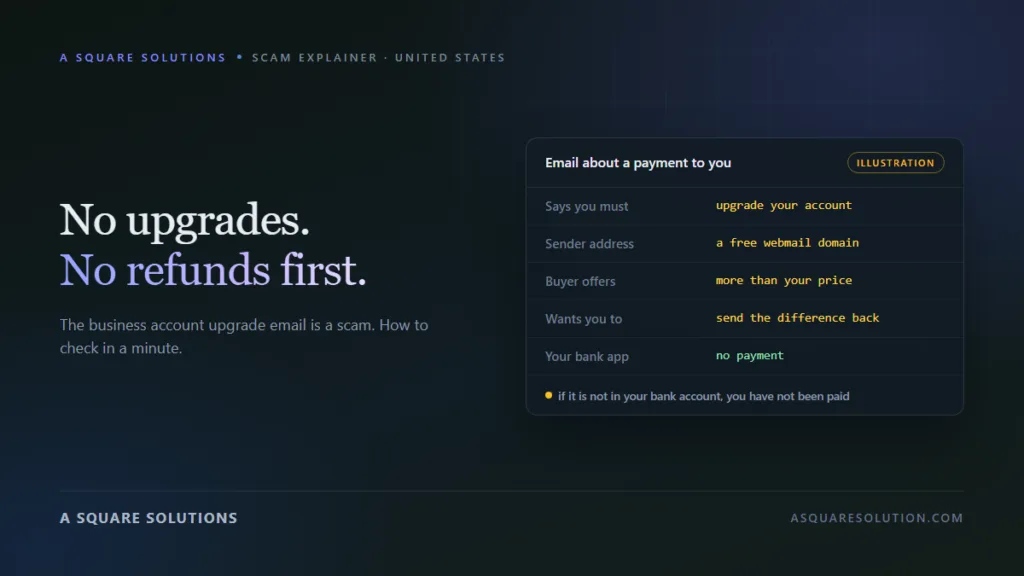
A buyer says they have paid you with Zelle. Then an email claims the money cannot arrive until you upgrade to a Zelle business account, or refund an “upgrade fee” the buyer says they covered. This guide explains how the trick works, how to check in under a minute, and what to do if you have already paid.
The short answer: if an email says you must upgrade to a business account, or pay an “upgrade fee,” before a Zelle payment can arrive, it is a scam. In Zelle’s own words, “there are NO upgrades.” Check your bank’s app. If the money is not there, you have not been paid.
That quotation comes from Zelle’s page on how to avoid an online marketplace scam, which describes this exact email.
Key takeaways
- Zelle has no account “upgrades.” An email demanding one is fake.
- Real Zelle emails do not come from Gmail, AOL or Yahoo. A Zelle logo proves nothing.
- Never send money to receive money, and never refund an “overpayment” you cannot see in your own account.
- If you have already paid, contact your bank using the number on your card, your banking app or its official website.
How the scam works
This one targets people selling on Facebook Marketplace and similar sites. Zelle itself has warned about it, and so did the Better Business Bureau in Wisconsin, in a June 2022 scam alert about Facebook Marketplace sellers (a press release republished by Urban Milwaukee).
- A buyer offers to pay with Zelle and asks for the email address or phone number you use for it.
- A fake “Zelle” email arrives. It says the payment cannot be completed until your account is upgraded to a business account.
- The refund twist. The buyer says they have paid extra to cover the upgrade and asks you to send them the difference. In the BBB’s example the extra amount is $300.
- No payment ever arrives. Whatever you send goes to the scammer. As the BBB puts it, the buyer never sent you any money in the first place.
Red flags in the email
- It asks you to upgrade, pay a fee, or refund money before you can receive a payment.
- The sender address is not from Zelle. Expand the “From” field and read the full address, not just the display name.
- It borrows the Zelle logo or name. Logos and profile pictures are easy to copy.
- The buyer offers to pay more than your price. The BBB’s advice is simple: do not trust anyone willing to overpay you.
Which email addresses does Zelle really use?
Zelle’s two pages do not say quite the same thing, so we give both. Its guidance on how to avoid phishing scams names @Zellepay.com as the only domain it uses. Its marketplace scam page lists @Zelle.com as well as @Zellepay.com.
Both pages agree on what matters here. An email from a free address such as Gmail, AOL or Yahoo is not from Zelle. And even a correct-looking address is not proof of payment, because only your bank account can show that.
How to check in under a minute
- Do not click links in the email and do not reply to it.
- Open your bank’s app or website yourself. Zelle payments show up in your bank account.
- If the payment is not in your account, you have not been paid, whatever the email or a screenshot says.
- Never send money “back.” An overpayment you cannot see in your own account does not exist.
Buyers who run this trick often send a picture of a “completed” payment too. Our guide to fake Zelle payment screenshots shows what to look for and why a screenshot is never proof.
Why sellers fall for it
The email arrives when you are expecting a payment, so it fits what you were waiting for. Business accounts are also a real idea at many banks, which makes an “upgrade” sound routine.
Then the buyer adds social pressure. They say they have already paid extra on your behalf, so refunding them feels like the fair thing to do. That is the same lever used in other marketplace frauds, which we cover in our guide to overpayment refund scams.
The way out is to ignore the story and look at the account. A payment either shows in your bank or it does not.
A safer way to take payment for a marketplace sale
- Decide how you will be paid before you meet, and be cautious with a buyer who will only use one method and pushes you to hurry.
- Check your own bank app before you hand over the item or ship anything.
- Keep the conversation on the marketplace. It leaves a record you can report.
- Treat any request to pay first as the end of the sale. A real buyer does not need your money.
For shipped items, use our checklist on how to verify a payment before shipping. For the wider set of tricks used on sellers, see our guide to Facebook Marketplace fake payment scams.
If you have already paid
- Contact your bank right away, using the number on your debit card, your banking app or the bank’s official website. Do not use contact details from the email.
- Report it to the Federal Trade Commission at ReportFraud.ftc.gov.
- Forward the phishing email to the Anti-Phishing Working Group at reportphishing@apwg.org. Forward scam text messages to 7726 (SPAM).
- Use the other routes Zelle lists. Its phishing guidance also names the FBI’s Internet Crime Complaint Center and, if your personal details were exposed, IdentityTheft.gov.
- Report the buyer to the marketplace.
We do not say here whether a payment you sent can be reversed or refunded. That depends on your bank and the circumstances, so ask your bank directly and do it quickly.
A second opinion
If an email or message looks off, paste its text into the free ScamCheck email checker for a quick read of common scam signs. No tool catches every scam. If in doubt, ask your bank.
The bottom line
There is no Zelle business account upgrade that unlocks a payment, and no buyer needs you to send money before theirs can arrive.
The test is simple. If the payment is not in your bank account, you have not been paid, and there is nothing to refund.
Frequently asked questions
Does Zelle have business account upgrades?
No. Zelle’s guidance says there are no upgrades, so any email asking you to pay for one is a scam.
What email address does Zelle use?
Zelle’s phishing guidance says its only email domain is @Zellepay.com, and its marketplace scam page lists @Zelle.com and @Zellepay.com. Either way, an email from a free address such as Gmail, AOL or Yahoo is not from Zelle.
The buyer says they overpaid. Should I refund the difference?
Only after checking your bank account yourself. In this scam nothing has been paid, so a refund is simply your money going to the scammer.
Is a Zelle confirmation screenshot proof of payment?
No. Screenshots are easy to fake. Only a payment that shows in your own bank account counts.
Who should I report a fake Zelle email to?
Tell your bank first. You can also report it to the Federal Trade Commission at ReportFraud.ftc.gov and forward the email to the Anti-Phishing Working Group.
The statements about Zelle in this article come from the two Zelle pages linked above, and the $300 example comes from the BBB Serving Wisconsin alert of June 2022. This article is educational and is not legal or financial advice. See our disclaimer.
Related reading: Fake Zelle payment screenshots · Overpayment refund scams · Facebook Marketplace fake payment scams · Verify a payment before shipping