
On 16 September 2026, a “vendor registration” invitation claiming to come from a major Dubai real-estate developer arrived through our website’s contact form. Every email authentication check on the notification passed. The invitation still did not survive verification. This is what we checked, what we found, and what we still cannot prove.
Unsolicited supplier invitations are attractive by design. They flatter your business, hint at large contracts, and ask only for a small next step. That is exactly why they are worth slowing down for.
This is a first-person case study of a high-risk vendor-registration lead, not a list of generic tips. Throughout, we separate three things: what the message claimed, what our technical checks showed, and what remains unproven. We treat it as a suspected impersonation attempt that closely matches a publicly documented vendor registration scam pattern. We are not calling it a confirmed scam, and we are not accusing any named company or person.
What happened
At 12:16 PM India time on 16 September 2026, our contact form produced a new lead notification. The person had filled in the form like any prospective client would:
- Name: a name matching a senior executive of the developer [redacted executive name]
- Email: an address on a .com domain that pairs the word “procurement” with the developer’s brand name [redacted sender address]
- Service interest: AI product development
- Budget: the highest option in our form’s dropdown
- Message: an invitation to register as an authorised supplier
The message named Emaar Properties PJSC as the sender’s organisation. We want to be precise here: this case study documents a message that claimed that affiliation. Nothing we found suggests the company, or the executive whose name was used, sent it or knew about it. If this was impersonation, they are the ones being impersonated.
The invitation, redacted
Here is a shortened excerpt. We removed the name, the address and the sign-off details.
Dear Sir/Madam,
…As part of our ongoing vendor development initiative, we invite your esteemed organization to engage in our vendor registration process and become an authorized [company] supplier.
If you are interested in registering as a [company] vendor, please confirm your interest by requesting the Pre-Qualification/Expression of Interest (EOI) form. Once your request is received, the necessary documentation and registration instructions will be provided.
…we look forward to your prompt response.
[redacted executive name], Snr. Management, Procurement, Supply Chain and Contracts Dept.
Read it again and notice what is missing. It does not name a project, a product, a deadline, a tender reference or an actual requirement. It never mentions AI, even though “AI product” was selected on the form. It asks for exactly one thing: a reply.
What the email headers actually revealed
We opened the original message source, the raw technical record that sits behind every email. This is the part most people get wrong, so it is worth going slowly.
The key point: the person never emailed us. They typed text into a web form on our site. Our own notification system then turned that submission into an email and sent it to our inbox. The headers describe that notification.
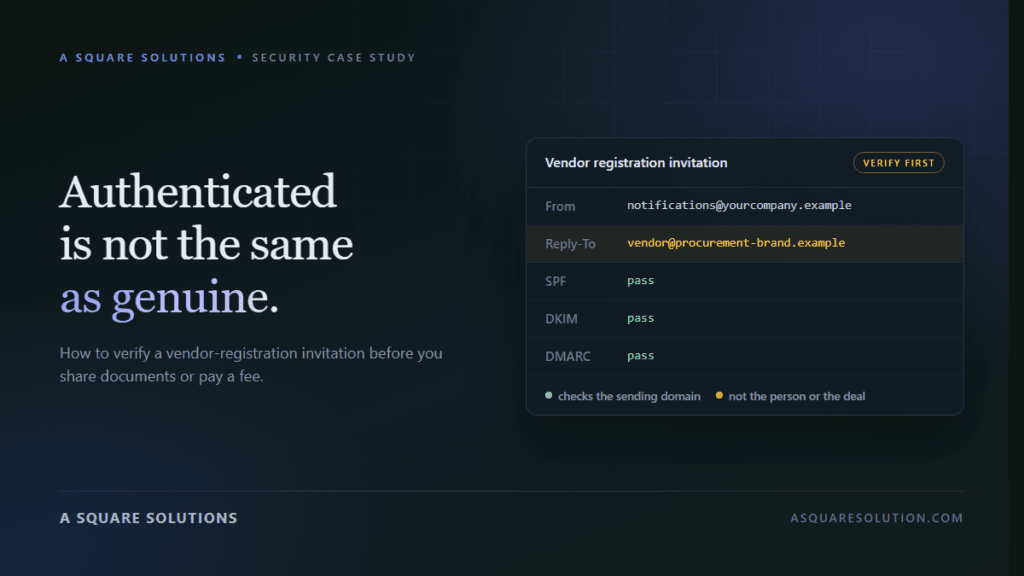
| Header | What it showed (redacted) | What it means |
|---|---|---|
| From | A Square Solutions <[our notification address]> | Our own form system sent the notification. |
| Reply-To | [redacted sender address] on [lookalike procurement domain] | The address typed into the form. Pressing “Reply” would write to this address, not to us. |
| SPF | pass, for our email provider’s sending subdomain | Our email provider’s servers are allowed to send for our domain. |
| DKIM | pass, signed by asquaresolution.com (plus the email provider’s own signature) | The notification was not altered after our system signed it. |
| DMARC | pass, for header.from = asquaresolution.com | The visible From domain lines up with the authenticated domain. |
Nothing in those results involves the procurement-looking domain at all. It appears only as text: in the Reply-To field and in the body, because that is what the person typed.
A contact form cannot check who owns an email address. Anyone can type any name, any company and any address into it. Everything in that submission is a claim until it is verified independently.
Why SPF, DKIM and DMARC did not prove legitimacy
A green “pass” is easy to read as “this is safe”. Those checks answer a much narrower question. It helps to separate three layers:
- Message authentication: Did this email really come from servers authorised by the domain it claims, and was it left unaltered? SPF, DKIM and DMARC answer this. In our case the answer was yes, for our own notification system.
- Sender identity: Is the person behind the message who they say they are? Authentication does not answer this. It checks domains, not people. Here the “person” was just form text.
- Business legitimacy: Is there a real opportunity, from a real buyer, through a real process? No email protocol answers this. Only independent verification does.
This does not only apply to contact forms. Anyone can register a lookalike domain, set up SPF, DKIM and DMARC properly, and send messages that pass all three checks. The pass is real. It just proves they control their domain, not that they speak for the company whose name is in it.
Authenticated means “this domain really sent it”. It never means “this offer is genuine”.
Warning signs in the vendor-registration request
None of these proves fraud on its own. Together, they justified treating the lead as high risk.
1. The domain was not the company’s domain. The address used a separate .com that joined “procurement” to the brand name. Large companies usually run procurement from their main domain or its subdomains. They rarely use a stand-alone hyphenated lookalike.
2. It came through the wrong door. A buyer at a large developer inviting suppliers through a small agency’s website contact form, instead of through its own procurement system, is unusual.
3. The message was entirely generic. “Dear Sir/Madam”, no mention of our business, no project, no requirement. The same text could be pasted into thousands of forms, and it reads as if it was written for exactly that.
4. The “request the form” hook. Instead of linking to an official supplier portal, the message asks you to write back to receive the EOI form. That keeps the next step, and whatever documents or links arrive with it, inside a channel the sender controls.
5. A senior-sounding name and title. The name matched a publicly listed senior executive of the company. That person’s published roles are executive and board positions, not the procurement title in the signature. Borrowing a real, searchable name is a common way to pass a quick online check.
6. The budget was a click, not a figure. The “500k+” in the notification is simply the top option in our own budget dropdown, which is priced in Indian rupees. The message itself mentions no budget, currency or scope. It should never be read as contract value.
7. Polite pressure. “We look forward to your prompt response”, together with flattering language like “esteemed organization” and “authorized supplier” status.
How the verification process assessed the lead
We did not reply, request the form, click anything or contact anyone. We relied on public records and the message itself. All external checks below were run on 16 September 2026, and they are external context, not something the email told us.
- Domain age: public registry data showed the Reply-To domain’s current registration was created in July 2026, roughly two months earlier. The company’s official website domain has been registered since 1998. New domains are not automatically suspicious, so we treated this as one signal among several.
- Mail setup: the Reply-To domain’s email was hosted on a general-purpose commercial email service and published no DMARC policy. The company’s official domain uses different mail infrastructure and publishes a strict DMARC “reject” policy. We found no shared infrastructure between the two.
- Official process: the company publishes a supplier registration page. Its supplier-portal guide says registration starts when a supplier clicks a registration link shared by the company. The guide describes the portal steps and does not mention requesting an EOI form by email or paying a fee.
- Office address: the address in the signature matched the company’s publicly listed head office. That makes the message look more credible, but it proves nothing. Anyone can copy a public address.
- Similar templates: security site PCrisk documents similar “vendor registration” emails impersonating UAE companies such as Etihad and flydubai. In those cases, recipients who asked for the EOI or questionnaire were sent forms requesting business information and identity documents. PCrisk’s flydubai report adds that victims were later told to pay upfront fees, such as registration charges or refundable “security deposits”.
- Public reports: we found no public report naming this specific domain or address. That does not mean it is clean. It means we have no independent report to point to.
Our overall assessment: high-risk, suspected impersonation. Do not proceed without independent verification through official channels.
What businesses should do before responding
Don’t use the contact details in the message to verify the message. Replying to ask “is this genuine?” reaches the same person who sent it.
Go to the company yourself. Type the company’s website address, find its supplier or procurement page, and use the phone number or portal it publishes. Ask whether the domain and the invitation are theirs.
Ask for specifics, through the official channel. A real procurement invitation can usually be tied to a tender or RFQ reference, a project scope, a named buyer you can reach through the company switchboard, and a registration link on the company’s own domain.
Keep documents back. Trade licences, tax certificates, director IDs and bank letters can be misused: they can be reused to impersonate your business. Share them only inside an official portal you reached yourself.
Treat any fee as a stop sign. Registration fees, “vendor code” charges, refundable deposits or paid tender documents requested by email should end the conversation until the company confirms them through a channel you found independently.
Watch your own auto-replies. Many contact forms, including ours, send an automatic “thanks, we’ll be in touch” message to whatever address is entered. That is normal, but it does tell the sender the form is active. Beyond that automatic acknowledgement, we did not respond.
If you are worried a lead may already have taken money or documents from you, our step-by-step recovery guide covers what to do first.
Procurement email verification checklist
- Is the domain after the
@the company’s own domain, or a lookalike that only contains its name? - Did the invitation arrive through a normal channel for that company, or through a web form, a free email account or a messaging app?
- Does it name a real project, requirement, deadline and tender or reference number?
- Does it link to an official supplier portal on the company’s own domain, or ask you to “request the form”?
- Can you confirm the buyer and the invitation through contact details you found yourself?
- Is anyone asking for fees, deposits, bank details or ID documents outside an official portal?
- Remember that SPF, DKIM and DMARC “pass” only verifies a domain. It does not verify a person or a deal.
Received an invitation like this and not sure what to make of it?
Paste the text into ScamCheck’s email checker for a free second opinion. It explains why something looks off and needs no sign-up. Treat it as a second opinion, not a replacement for verifying with the company directly.
What remains unproven
This matters more than a confident-sounding verdict.
Directly observed: the form submission, its wording, and the notification’s headers, including the Reply-To address and the SPF, DKIM and DMARC results for our own notification.
Independently checked (external context): public registry and DNS records for the Reply-To domain and for the company’s official domain; the company’s published supplier-registration process and head-office address; public professional records for the executive whose name was used; and published reports of similar templates.
Our inference: that this was probably an impersonation attempt following a known vendor-registration pattern. That conclusion comes from several signals pointing the same way, not from any single piece of proof.
Still unknown: who actually submitted the form; what the “EOI form” would have contained, since we never requested it; whether fees or documents would have been requested; and whether any threat-intelligence service has flagged the domain, since we did not have access to commercial blocklists. We have no confirmation from the company either way. We have seen no evidence of any payment request, malicious file or link in this case, because the conversation never reached that stage.
Final takeaway
The most convincing part of this invitation was not its wording. It was the context: a respected company name, a real executive’s name, a real office address, and a notification with every security check showing green.
None of that answered the only question that matters: can you confirm the opportunity through a channel you found yourself? If you cannot, it is not an opportunity yet.
Frequently asked questions
Is every vendor registration invitation a scam?
No. Companies do invite suppliers to register. The difference is the channel: genuine invitations can be confirmed through the company’s own website, portal or switchboard, and registration normally happens on the company’s own systems.
If SPF, DKIM and DMARC pass, is the email genuine?
Not necessarily. Those checks confirm that the sending domain authorised the message and that it was not altered. They say nothing about whether the person is who they claim to be, or whether the business offer is real. A lookalike domain can pass all three.
Why would someone ask me to request an EOI form instead of sending a link?
We cannot know the intent in this case. In documented vendor-registration scams, asking you to reply first starts a conversation the sender controls. The forms, documents or links that follow can then be tailored to your business.
Do companies charge a fee to register as a vendor?
The supplier-registration guide we reviewed for the company named in this case describes portal steps and mentions no fee. Other organisations have their own rules. Before paying anything, confirm the fee through the organisation’s official website or switchboard, never through the person asking for it.
How do I verify a procurement email?
Check that the sender’s domain is the company’s own. Find the company’s supplier page and contact details yourself. Ask for a tender or reference number through that official channel. Register only through an official portal you reached independently.
Should I reply to ask whether the invitation is genuine?
No. A reply goes to the same sender and confirms your inbox is active. Verify through contact details you found independently.
Disclaimer: This case study documents an unsolicited message that claimed an affiliation with a named company. It does not establish that the named company, or any named individual, was responsible for the message or involved in it in any way. Identifying details have been redacted, and technical findings reflect public records checked on 16 September 2026. This article is educational and is not legal advice. See our disclaimer.
Related reading: The web design lead that didn’t survive a background check · How we spotted three fake hosting billing emails · How to identify phishing emails · How to verify fake payment screenshots · How we built ScamCheck, our AI scam detection platform
Run an online business that handles payments or supplier onboarding? We build fraud-prevention and verification automation for exactly these checks.