
The AI Browser Paradox 2025: Innovation Meets Unprecedented Security Risks
Introduction: The Promise and the Peril
Today’s web browser isn’t just a portal to sites—it’s evolving into an autonomous AI-enabled agent. Browsers such as ChatGPT Atlas and Comet from OpenAI and Perplexity respectively, are designed to summarise, act, navigate and even execute tasks for users. The innovation is undeniable, but so are the risks.
Security researchers warn these “smart” browsers may be a cybersecurity time bomb.
AI browsers are changing how we interact with the web — and in doing so they expand the browser attack surface in ways traditional threat models never anticipated.
In this article, we’ll explore how AI browsers work, why they pose novel threats, and what organisations and users must do to navigate this paradox of innovation meeting unprecedented risk.
How AI Browsers Work: From Passive to Agentic
Traditional browsers wait for user input and simply render web pages. AI browsers, in contrast, can interpret, summarise, navigate, and in some cases act on behalf of the user. For example, they may fetch documents, fill out web forms, or automate workflows.
But this high level of autonomy increases the attack surface. A security piece from TechCrunch aptly : “The main concern … is around ‘prompt injection attacks,’ a vulnerability where malicious instructions are hidden on a web page and interpreted by the AI browser.”
We are seeing a shift from user-driven browsing to agent-driven browsing, and that shift carries both productivity gains and deep security implications.
TechCrunch — The glaring security risks with AI browser agents.
The Hidden Threats: Why Innovation Brings New Risks
Prompt Injection & Hidden Instructions
One of the biggest threats is indirect prompt injection. Security research has shown attackers can hide instructions within web content or images which AI-browsers misinterpret as user commands.
Example: A malicious image contains hidden text that tells the browser’s AI agent to access bank accounts.
Because the AI agent acts with the user’s privileges, fundamental web security controls like same-origin policy can fail.
Data Leakage & Automation Risk
AI browsers frequently ask for broader permissions (calendar, email, tabs) and can expose data if compromised. The Verge calls them “a cybersecurity time bomb”.
Automation capabilities, while useful, can execute unintended actions: from sending emails to making purchases without full user oversight.
Supply Chain & Extension Attack Surface
Adding AI capabilities into browsers means the extension ecosystem and plugin model become more dangerous. Malicious extensions or compromised agents can exploit the trust model of the browser.
The convergence of AI + browser + extension amplifies risks.

Real-World Cases & Emerging Evidence
Several flagship AI browsers have come under security scrutiny:
Perplexity’s Comet browser was found vulnerable to prompt injection that allowed attackers to hijack user sessions and access sensitive data.
The recently released OpenAI Atlas browser is under hacking warning for its powerful automation features.
These data points show that the threat is not hypothetical—it’s present, proven, and rapidly evolving.
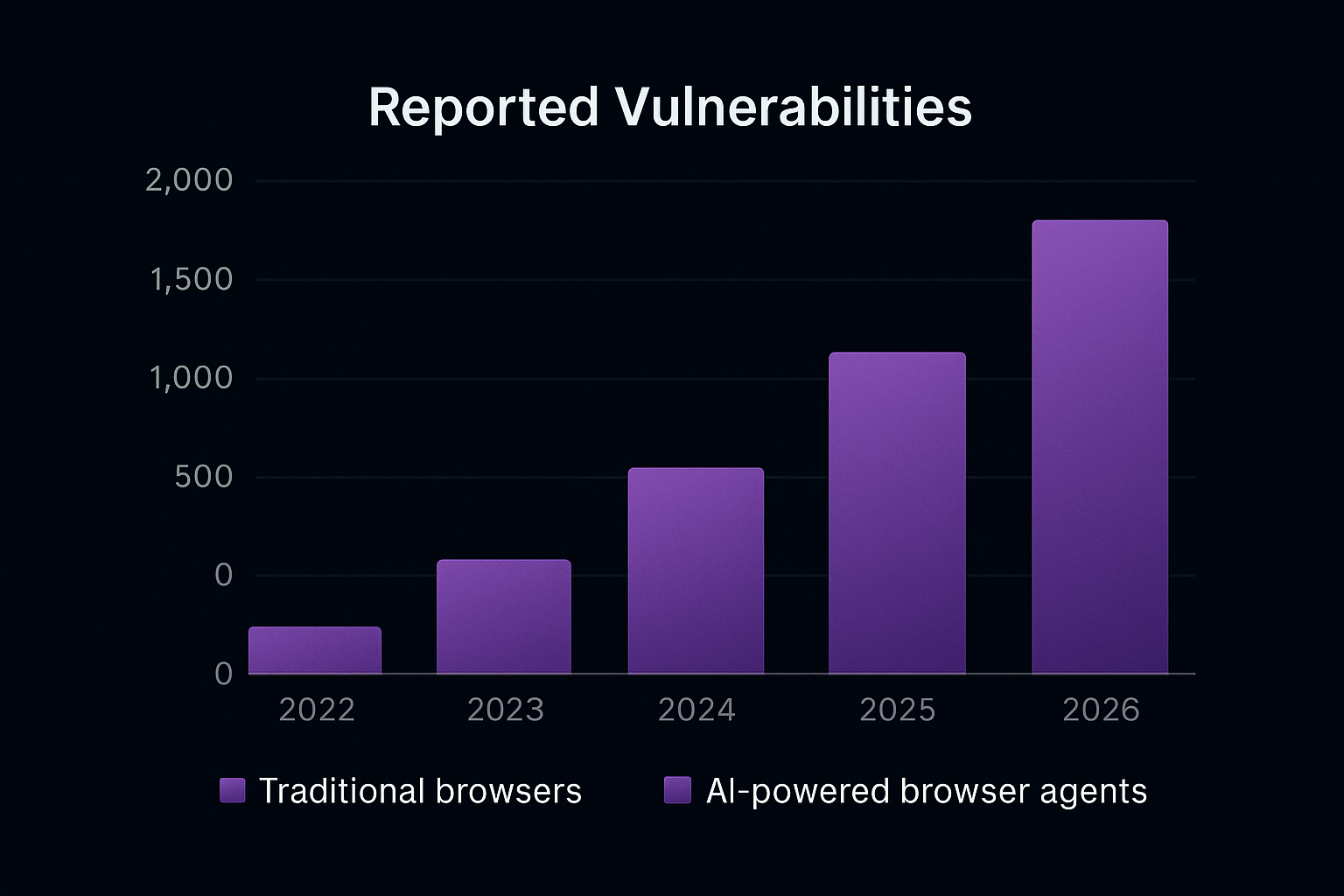
Innovation at a Cost: Balancing Productivity and Protection
The allure of AI browsers is real—they promise to save time, simplify workflows, and deliver smarter experiences. But organisations must ask: at what cost?
Are the permissions being granted truly necessary?
Can the browser’s AI actions be audited and controlled?
Are new threat vectors (prompt injection, agent automation, cross-tab data leaks) recognised and mitigated?
For enterprises, many researchers recommend treating AI browsers as unapproved software until governance is strong.
From a digital marketing/business POV: as agencies build AI-enabled tools, they must also prioritise risk modelling, auditability, and least-privilege architecture.
Recent audits reveal that AI browsers can be manipulated by prompt injection and hidden payloads, enabling data exfiltration or unauthorized actions when agents run with elevated permissions.
Practical Guardrails: How to Stay Safe
Here are actionable practices for businesses and advanced users:
Sandbox agentic browsing: Keep AI-browser tools separate from sensitive systems (finance, HR).
Gated permissions: Use strict access control—no automatic changes, browsing, or data access.
Prompt filtering and isolation: Distinguish user input from untrusted content before feeding to AI.
Audit all agent actions: Logging, reversibility and user oversight are essential.
Delay broad adoption: Early versions of AI browsers are still vulnerable; remain cautious.
The Future Outlook
AI browsers offer a glimpse into a future where our digital assistants not only aid but act. But with that power comes responsibility and risk. It’ll take years of secure design, regulatory frameworks, and evolving threat models to ensure these tools are safe.
For businesses and creators: staying ahead means monitoring the landscape, designing with security first, and treating the exciting side of AI browsers with healthy caution.
Conclusion: Innovation Needs Safeguards
In the race for smarter browsing, we must not let innovation outpace protection. AI browsers represent both a paradigm shift and a security frontier. Embracing them is optional—but understanding the risks is essential.
One day, browsers may think for us—but until we control how they act, we must treat them as both enablers and threats.
Enterprises adopting AI browsers must assume they increase risk — until agent privilege, provenance and action-auditing are solved, treat them as unapproved software in sensitive environments.